
Shopping Cart
There are no more items in your cart
- Tenoacquisti.com
- SEO and SEM Tutorials
Google Tag Manager server-side is one of the most significant evolutions in the world of web analytics in recent years. It radically changes the way tracking data travels between the user's browser and marketing platforms. In this guide, we will see how it works, what concrete advantages it brings to an e-commerce, what hosting solutions exist, and — above all — from what traffic and revenue threshold it really makes sense to adopt it.
How GTM server-side works compared to the classic
In traditional GTM, known as client-side, all tracking tags are executed directly in the user's browser. Each library — Google Analytics, Meta Pixel, Criteo, Klaviyo — is loaded on the page and sends data directly to the servers of the respective platforms.
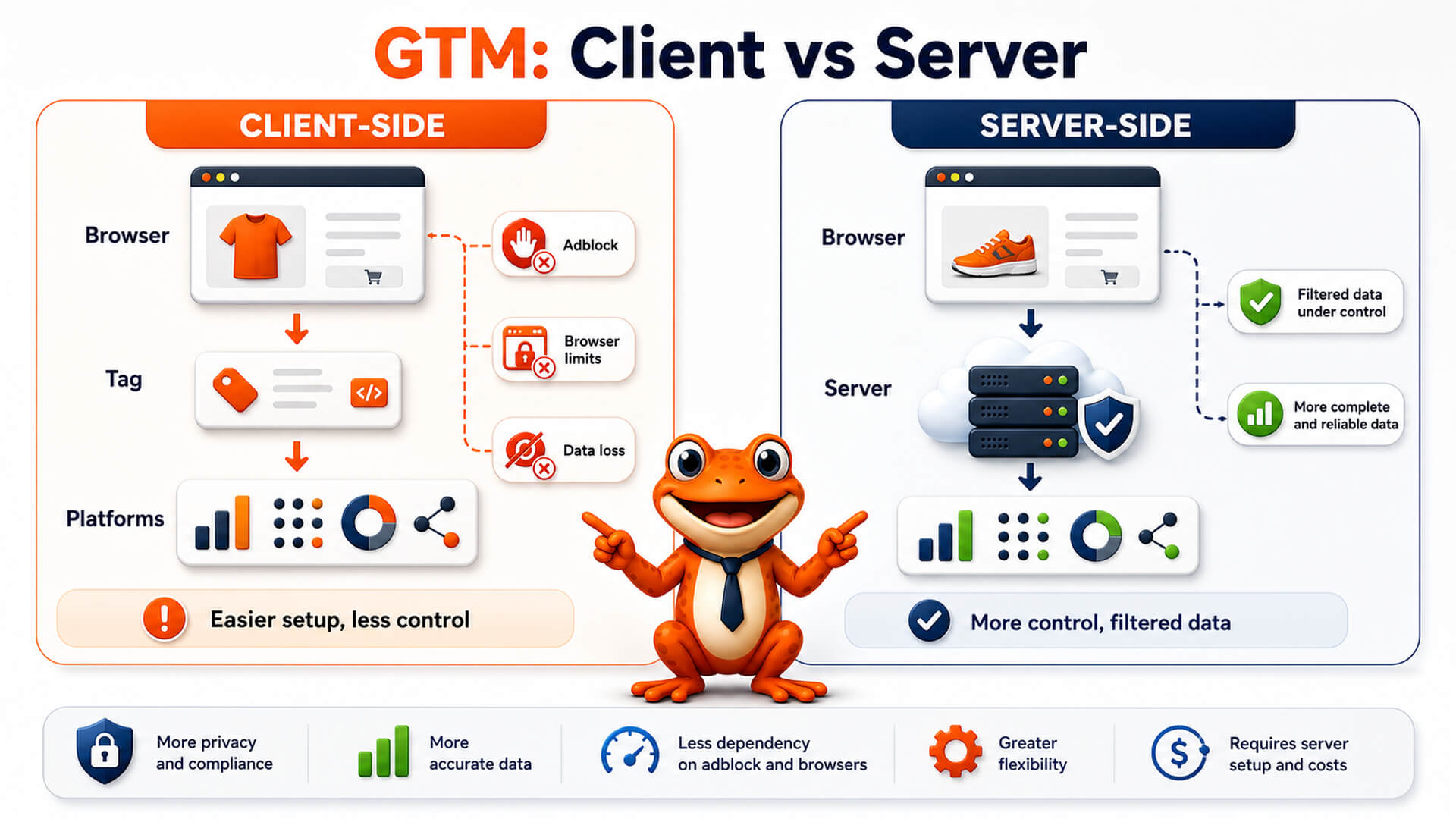
With server-side GTM, an intermediate level is introduced: a server container that runs on an infrastructure controlled by you. The browser sends data to this server, which processes, filters, and forwards it to the final destinations. Requests to Google, Meta, and other platforms originate from your server, not the user's browser.
GTM Client-Side
Tags run in the browser. Each platform loads its own JS library on the page. Data goes directly to third-party servers.
GTM Server-Side
Tags run on an intermediate server. The browser only communicates with your server. Data is filtered and forwarded to platforms in a controlled manner.
Concrete advantages for an e-commerce
Data quality and recovery of lost conversions
This is the most measurable and direct advantage. Ad blockers, browser extensions, and Safari's ITP restrictions block or limit requests to known tracking domains like google-analytics.com or connect.facebook.net. With server-side GTM, requests originate from your domain, making the traffic indistinguishable from normal site traffic.
- Fewer lost conversions: an average recovery of 10–30% of events that client-side does not capture is estimated.
- More accurate data for campaigns: Google Ads and Meta Ads optimize bidding algorithms on received conversion data. More data means more efficient campaigns.
- First-party cookies with full duration: Safari with ITP truncates third-party cookies to 7 days or less. With server-side, cookies are set by your server as first-party, maintaining the configured duration (e.g., 180 or 365 days).
Performance and Core Web Vitals
Each third-party JS library loaded client-side has a cost in terms of page weight, parsing time, and main thread blocking. Server-side GTM drastically reduces the number of scripts loaded on the browser.
- Improvement of TBT (Total Blocking Time) and LCP (Largest Contentful Paint), critical metrics for Core Web Vitals and Google ranking.
- The latency of calls to third-party platforms shifts to the server, invisible to the end user.
- Lighter pages mean a better user experience, especially on mobile and slow connections.
Privacy, GDPR, and data control
With the server-side container, you have full control over what is sent to external platforms. This substantially changes compliance management.
- You can anonymize IP and sensitive data before they reach Google, Meta, or other vendors.
- You can apply consent logic directly on the server, ensuring that data is forwarded only after verified consent.
- Data transits through your infrastructure, facilitating the documentation of the data flow required by GDPR.
Security
- Reduction of XSS attack surface: fewer third-party scripts on the browser mean fewer vectors for injecting malicious code.
- Possibility to validate and sanitize incoming data before forwarding it, preventing data poisoning in analytics platforms.
From what threshold it is convenient for an e-commerce
There is no universal threshold, but there are practical indicators. Server-side GTM makes sense when the value of recovered data and savings in advertising inefficiency outweigh infrastructure and management costs.
| E-commerce profile | Indicative annual revenue | Monthly ads budget | GTM Server-Side |
|---|---|---|---|
| Small, recently started | Below €150,000 | Below €1,000/month | Not recommended. The cost exceeds the benefit. |
| Medium growing | €150,000 – €500,000 | €1,000 – €5,000/month | To be evaluated. Worth it if there are tracking or ITP issues. |
| Medium-large | €500,000 – €2,000,000 | €5,000 – €20,000/month | Recommended. Data recovery more than justifies the costs. |
| Large or enterprise | Over €2,000,000 | Over €20,000/month | Essential. The impact on ROAS and compliance is significant. |
Practical rule: if you spend more than €2,000–3,000 per month on advertising and notice a low match rate in Meta or Google conversions, server-side GTM will pay off in the first quarter.
Hosting solutions: official and self-hosted
The server-side GTM container is distributed as an official Docker image by Google. It can be run on three categories of infrastructure.
Google Cloud Platform — the official solution
This is the path recommended by Google and is configured directly from the GTM interface, without touching code or servers. Provisioning occurs via Cloud Run, a serverless environment that automatically scales based on traffic and resets when there are no active requests.
- Automatic updates of the GTM image.
- Included preview server for tag debugging.
- Automatic scaling: no risk of saturation in case of peaks.
- Indicative cost: $10–30/month for low/medium traffic, up to $150/month for high-volume e-commerce.
Stape.io — the most popular managed partner
Stape.io is the most used managed hosting platform in the industry specifically for server-side GTM. It is recognized in Google's documentation as a recommended solution. It offers a simplified interface, included preview server, and additional templates compared to the standard GTM library.
- No cloud configuration required.
- Custom domain or on Stape subdomain.
- Indicative cost: $20–80/month based on request volume.
VPS self-hosted — total control, greater complexity
For those who want full control over data and infrastructure, it is possible to host the GTM container on a dedicated Linux VPS. The container runs via Docker, with Nginx as a reverse proxy to manage HTTPS and the custom domain.
This solution is not officially supported by Google, but it is technically solid if managed correctly.
Minimum VPS requirements
| Resource | Minimum | Recommended |
|---|---|---|
| CPU | 1 vCPU | 2 vCPU |
| RAM | 512 MB | 1–2 GB |
| OS | Any Linux | Ubuntu 22.04 LTS |
| Docker | v20+ | latest stable version |
Estimated monthly costs for self-hosted VPS
| Cost item | Indicative monthly amount | Notes |
|---|---|---|
| VPS (2 vCPU, 2 GB RAM) | €10–20/month | Hetzner, OVH, Contabo or equivalents |
| SSL Certificate | €0 | Free Let's Encrypt |
| Management and maintenance | €50–150/month | Docker updates, monitoring, backup, anomaly interventions. Estimated on external professional or partially dedicated internal system administrator. |
| Total estimated | €60–170/month | Varies based on the person managing the server |
Warning: the cost of the VPS is the minor part. The real cost of self-hosting is the management time: Docker image updates, availability monitoring, SSL certificate management, and intervention in case of downtime. Without a dedicated technical figure, managed solutions (GCP or Stape.io) remain more convenient overall.
Comparison between solutions
| Feature | GCP Cloud Run | Stape.io | VPS self-hosted |
|---|---|---|---|
| Official Google support | Yes | Partial | No |
| Setup from GTM interface | Yes | Yes | No |
| Automatic updates | Yes | Yes | Manual |
| Included preview server | Yes | Yes | Manual configuration |
| Total control over data | Data on GCP | Data on Stape | Total |
| Total monthly cost | $10–150 | $20–80 | €60–170 (VPS + management) |
| Setup complexity | Low | Very low | High |
When NOT to adopt GTM server-side
- Your e-commerce has an annual revenue below €150,000 and a reduced ads budget: fixed costs exceed the benefit.
- You do not have a technical figure capable of managing the initial configuration and maintenance.
- You are still optimizing the basic aspects of client-side tracking: resolve those first.
- Your CMP (Consent Management Platform) is not correctly integrated: server-side does not solve upstream consent issues.
FAQ
Does server-side GTM completely replace client-side?
No. The two work together. The client-side container continues to exist on the site and collects events, which are then forwarded to the server-side container via a transport tag. Server-side does not eliminate GTM from the browser, it lightens it.
Are ad blockers completely bypassed?
Not completely, but very significantly. Ad blockers block requests to known tracking domains. With server-side, requests originate from your domain (e.g., gtm.yourdomain.com), so most ad blockers do not intercept them. Some advanced blockers based on DNS or behavioral filters can still act, but data loss is drastically reduced.
Does it improve campaign ROAS?
Indirectly yes. Google Ads and Meta Ads algorithms optimize on the conversion data they receive. If today you are transmitting 70% of real conversions due to blocks or data loss, your algorithm is optimizing on an incomplete sample. Recovering that 30% means giving the system more correct signals, with positive effects on the cost per acquisition in the medium term.
Does Preview Mode work in self-hosting?
It requires a second separate container configured with RUN_AS_PREVIEW_SERVER=true. It is not automatically included as in managed solutions. It is technically feasible but adds complexity to the self-hosted architecture.
Which hosting solution to choose to start?
For those starting from scratch without cloud experience, Stape.io is the quickest choice: setup in a few minutes, included preview server, no GCP configuration. For those who already have a Google Cloud account and want the officially supported solution, Cloud Run on GCP is the main path. Self-hosting on VPS makes sense only if you have an internal technical figure who can manage it and have stringent data sovereignty requirements.
Does server-side GTM solve GDPR issues?
It helps significantly, but it is not a standalone solution. It gives you the tools to control and filter data before it reaches third parties, but you still need a correctly configured CMP, an updated cookie policy, and integrated consent logic in the server-side flow. It is a compliance tool, not a shortcut.
How long does it take to implement?
With GCP or Stape.io, server provisioning takes less than an hour. Complete configuration — GTM client, server-side tags, conversion testing — typically requires 1–3 days of work for an experienced professional, depending on the complexity of integrations (GA4, Meta CAPI, Google Ads, etc.).